
How it works
From your AI policy to a certified firm, in two parts
DoubleChecked AI Launchpad takes each person through your policy and training, records a verified acknowledgment, and then teaches them to use the tool with short examples and quick checks.
Plays from YouTube when you press play.
Read the transcript
Think of AI as a capable assistant you talk to in everyday sentences. Ask it clearly, and it can draft, summarize and explain in seconds. Used well, it gives you time back.
But an assistant is only as safe as what you hand it. So before you type anything, pause and ask one simple question. What kind of information is this?
Many firms use three levels, and yours may name them differently. GREEN is public or made up, and it is fine in any approved tool. YELLOW is client and firm information, like names, account numbers and files. It belongs only in your firm's approved account, never in a personal or free AI tool. RED never goes into any AI tool. Passwords, account keys, and anything a contract or court order says cannot be shared.
Use only your firm's approved tool, signed in with your firm's account. A personal account, or a similar looking app, is not covered, even if it feels the same.
Here is a made up moment. The weak way: someone opens a free AI app on their phone and pastes in a client statement, along with the portal password. The strong way: they use the firm's approved account, share only what the task needs, and leave every password out.
Then check every number, name and date. AI can sound confident and still be wrong. And whoever sends the output owns it, so read it as if you wrote it yourself.
Not sure which level something is? Ask the person your firm names for AI questions. A quick question is always the right move, and no one minds being asked.
Your training and certification record, kept inside your firm, shows you have learned all this. It is your firm's own record, not an outside credential. Now you are ready to start.
How does a firm get set up?
Short answer
A firm gets set up with DoubleChecked's help. We load your AI policy, your training content and your roster of people, with names, work emails and titles. If you do not have a policy yet, assisted setup drafts one from templates using Claude, and your firm approves it before anyone sees it.
You send us your roster and we load it for you. It lives only in the application's database, never in files we keep or share. Your firm's link is created at the same time, along with a private, read-only progress page for firm leaders. Only the people you name can open it, each with a one-time code emailed to them.
Adding a firm is a configuration change on our side, not a custom build, so every firm gets the same, tested flow.
How do people start?
Short answer
People start from a kickoff email that carries your firm's link. They open it, type their work email, and the email is checked against your roster. There is no account to create and no password to remember. DoubleChecked sends the kickoff emails for you and checks that each one was delivered.
What is in Part 1?
Short answer
Part 1 is AI essentials, your firm's training and your AI policy, followed by certification. The essentials cover what Claude is, good habits, and how to choose a Claude model for a task. People read your policy in full, then sign by typing their name and entering a one-time code emailed to them.
1 Firm link
launchpad.doublechecked.com/t/example
Welcome to Example Advisory LLP AI onboarding
Work email
morgan.ellis@exampleadvisory.com
Start
No account. No password.
2 Essentials and training
Part 1 of 2
- AI essentialsDone
- Choosing a Claude modelDone
- Firm trainingDone
- Policy reviewIn progress
- CertifyNext
3 Policy review
Example Advisory AI Use Policy
I have read the firm's AI policy and agree to follow it.
4 Certify with an emailed code
Confirm it is you
We sent a code to m••••@exampleadvisory.com. It can take 5 to 10 minutes to arrive.
Type your full name
Morgan Ellis
Sign and certify
5 Certificate
AI Tools Compliance Certification
Morgan Ellis
Example Advisory LLP, March 4, 2026
Download certificate
6 Part 2, hands-on
Use Claude to learn Claude
- Documents
- Slides
- Designs
- Spreadsheets
- Office add-ins
- Artifacts that work
Starts once the firm's Claude account is ready.
The code email can take 5 to 10 minutes to arrive, and the screen says so. Progress saves at every step, so a person can stop and come back through the same link.
What happens at certification?
Short answer
At certification the person's record is saved and cannot be edited afterward. It holds their name and title at signoff, the steps they completed, the exact acknowledgment they agreed to, when they signed and how their email was verified. They can download their certificate, and DoubleChecked, or your own IT contact, is told their AI tool account is needed.
AI Tools Compliance Certification
This certifies that
Morgan Ellis
Senior Associate
has completed the firm's AI training and acknowledged the Example Advisory AI Use Policy, and agrees to follow it when using AI tools for firm work.
Email confirmed by one-time code sent to morgan.ellis@exampleadvisory.com, March 4, 2026
AI Launchpad by DoubleChecked
The certificate is your firm's internal record that a person was trained and acknowledged your policy. It is not an accredited, CPE or professional credential, and it says so.
What is in Part 2?
Short answer
Part 2 is hands-on: use Claude to learn Claude. Once the person's account in your firm's AI tool is ready, they start with a short required core, then a quick tour of what Claude can do, then lessons they choose, on their own kind of work. At the end of every lesson they have made something of their own. Training is Claude-first today.
The required core is five short lessons: using Claude safely at your firm, talking to Claude, giving Claude your material, checking before you send, and writing your own instructions for Claude. The tour is a quick look at each Claude feature your firm has turned on.
Then people choose their lessons in four areas: making things (documents, slides, designs, spreadsheets, live artifacts and the Office add-ins), finding things out, working smarter, and using Claude anywhere. Someone who already knows a lesson can pass a one minute check to skip it, and an elective that is not for them can be set aside. Which electives appear depends on the Claude features your firm has turned on.
Part 2 opens only once the account exists and only after the person has acknowledged the policy that governs it, so nobody uses a firm AI tool before they have read and agreed to your rules.
Can people do the hands-on lessons inside Claude?
Short answer
Yes. Hands-on lessons run inside Claude with the DoubleChecked training plugin, or on the web, where each lesson's prompt is copied into Claude. Both count fully, and a person can mix them. Each person picks their own level: beginner, moderate, advanced or expert. In Claude they can tap the choices shown in the chat instead of typing. The plugin is optional and in pilot, and the website path always works.
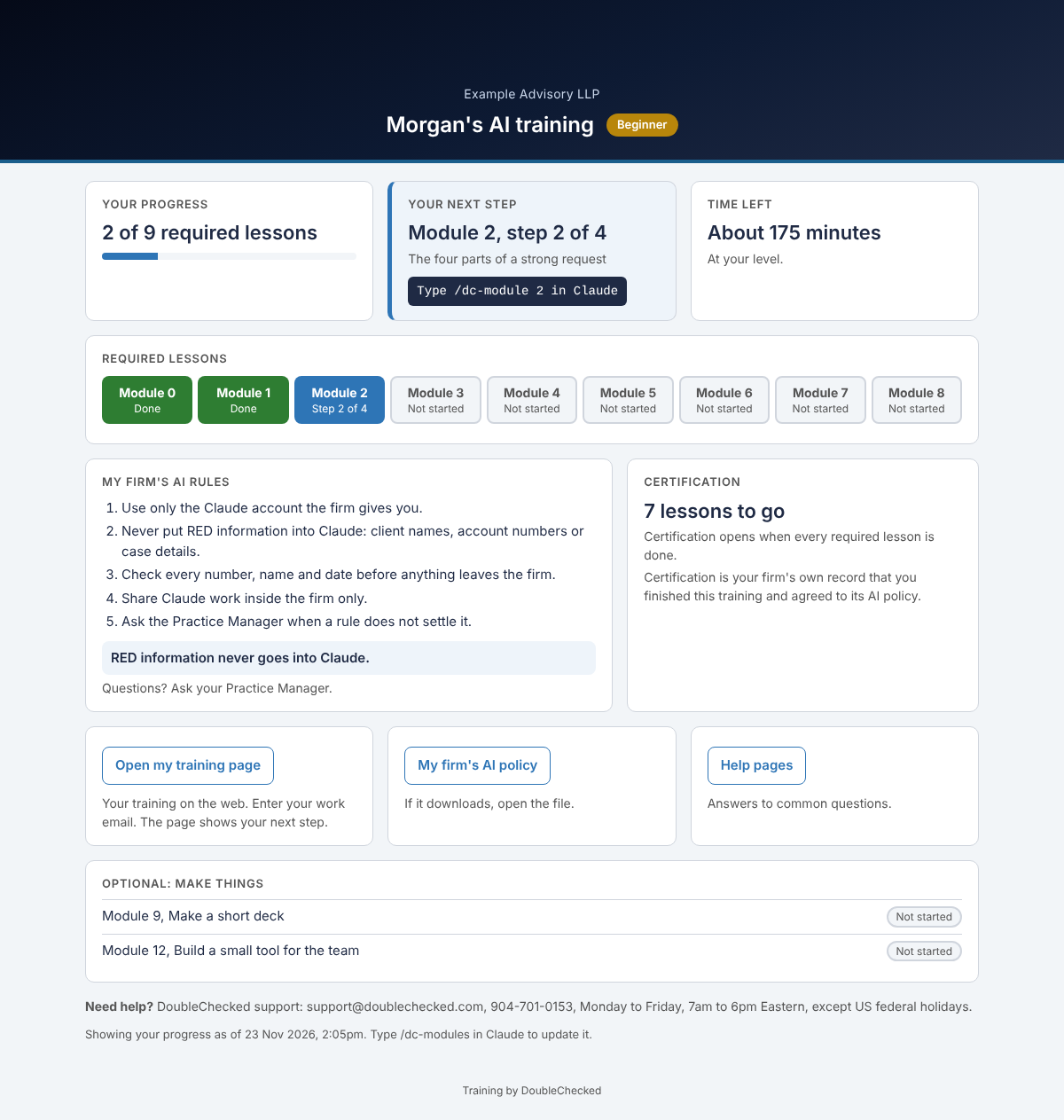
In Claude, a person types: start my training. Claude takes it from there, with one training page beside the chat and choices to tap instead of type. People who like shortcuts can type /dc-start instead. Each person picks their own level, and they can make lessons harder or easier at any time.
Each lesson opens with a short safety check based on your firm's rules, scored by Launchpad, not by Claude. Then come hands-on steps that use only made-up data, because lessons are practice. Launchpad tracks when each lesson starts and ends on its own server, and the record notes which lessons were done and when, whichever path was used.
The plugin connects to the person's training record with their work email and a one-time code. There is no password and no account. What the plugin records.
When do people certify if they train hands-on first?
Short answer
Last. With two-step certification, Part 1 ends with a policy acknowledgment, signed with a one-time code emailed to the person. The acknowledgment asks for their Claude account. Then come the hands-on lessons, inside Claude or on the web. Certification comes last, once the short required core and the tour are done, with a fresh emailed code. The lessons a person chooses never hold back certification.
Acknowledge the policy
AI essentials, your training and your policy, then an acknowledgment signed with an emailed code.
Account requested
DoubleChecked, or your own IT contact, gets the account request. IT can confirm the account is ready with one click.
Hands-on lessons
Inside Claude with the training plugin, on the web, or a mix. A short required core and a quick tour, then lessons people choose.
Certify
A fresh emailed code. The certificate is your firm's own record that the person was trained and agreed to your policy.
What does your firm see?
Short answer
Your firm's leaders get a private progress page. Only the people you name can open it, each signing in with a one-time code we email to their work address. It shows each person as in progress, acknowledged or certified, with their steps done, whether their Claude account is ready, and who needs a nudge to start the hands-on lessons. Certificates download from the page, one at a time or all at once. DoubleChecked sends the kickoff emails for you, and sends you the full record export whenever you ask.
Certification status
2 of 6 certified, and counting.
- 6Team members
- 2Certified
- 3Acknowledged
- 1In progress
- 33%Completion
- Morgan EllisSenior AssociateCertified, Account ready Feb 24, 2026, hands-on complete5/5✓ Certified3/4/2026
- Avery ChenParalegalCertified, Account ready Feb 25, 2026, hands-on complete5/5✓ Certified3/6/2026
- Jordan PatelTax ManagerPolicy confirmed Mar 2, 2026, not certified yet, Account ready Mar 3, 2026, hands-on started4/5Acknowledged3/2/2026
- Riley BrooksOffice ManagerPolicy confirmed Mar 5, 2026, not certified yet, Account ready Mar 6, 2026, hands-on not started3/5Acknowledged3/5/2026
- Sam OkaforPartnerPolicy confirmed Mar 9, 2026, not certified yet, waiting for a Claude account3/5Acknowledged3/9/2026
- Taylor NguyenStaff AccountantPolicy not confirmed yet1/5In progress
What happens when our policy changes?
Short answer
When your policy changes, new signoffs use the new version and existing certifications stay exactly as they were signed. A certificate is never rewritten to say something a person did not agree to, which is what makes the record worth handing over.
See it with your own policy loaded
Book a short walkthrough and we will show you the employee flow, the certificate and the record, using a sample firm. Or request early access and we will be in touch.